
Are you tired of juggling multiple apps just to keep your team’s tasks, video calls, chats, and files organized? If your workflow feels more like a chaotic circus than a streamlined process, you’re not alone.
Imagine having everything you need to manage your projects, communicate with your team, and share files all in one place. Sounds like a dream, right? Well, Edworking is here to turn that dream into reality. This all-in-one platform is designed to boost your productivity and simplify your workflow, making it a perfect fit for freelancers, project managers, and small businesses. But why should you consider investing in Edworking? With its seamless task management, real-time collaboration features, and customizable workflows, Edworking promises to eliminate the inefficiencies of switching between apps. Plus, with lifetime access plans starting at just $69, it could be the game-changer your business needs. Want to find out if Edworking is worth the hype? Click here to learn more about the Edworking Lifetime Deal and discover how it can transform the way you work. Stick around, because this review might just convince you that Edworking is the missing piece in your productivity puzzle.
Introduction To Edworking: A Lifetime Workflow Solution
Are you tired of juggling between apps to manage your tasks and team communications? Edworking offers a seamless solution by bringing everything together. It is designed to boost productivity and streamline workflows. Whether you’re a freelancer, project manager, or small business owner, Edworking consolidates tasks, files, video calls, chats, and documents into one platform.
Understanding Edworking And Its Purpose
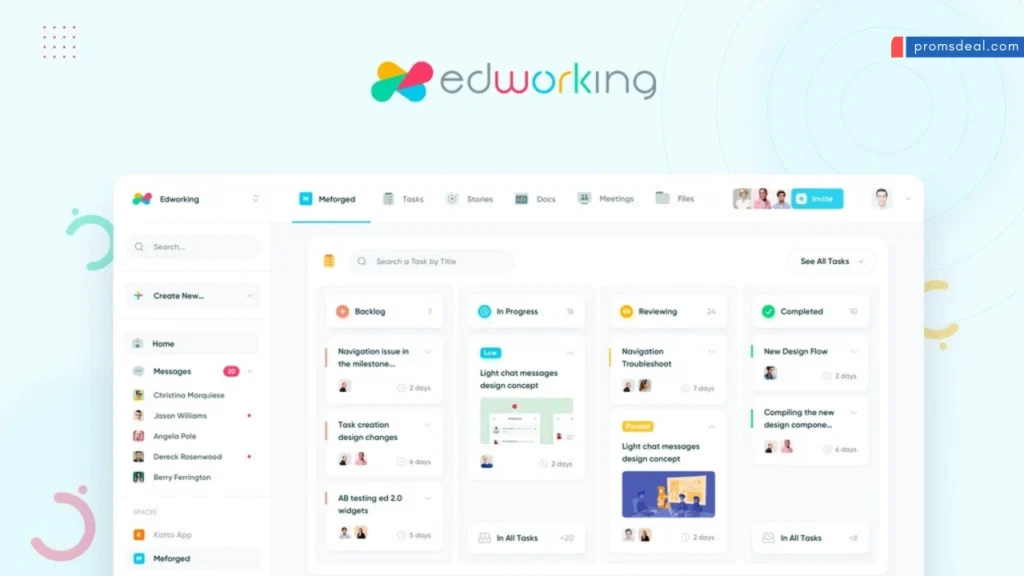
Edworking is an all-in-one platform for project management. It merges task management, real-time collaboration, and workflow customization. With a customizable Kanban board, users can create and assign tasks easily. Real-time collaboration is facilitated through group and private chats, file sharing, and HD video calls. This ensures team discussions remain organized and projects are completed timely.
Integrations with API, G-Suite, Google Calendar, Pabbly Connect, and Zapier make Edworking versatile. It is GDPR-compliant and includes AI functionalities to enhance productivity. Mobile access via iOS and Android apps ensures you stay connected wherever you are.
Who Can Benefit From Edworking’s Lifetime Deal?
The Edworking Lifetime Deal is ideal for freelancers, project managers, and small businesses. It eliminates the hassle of switching between multiple apps for task management, communication, and file sharing. The lifetime access plans offer significant savings compared to original pricing. Plan 1 costs $69 for 1 workspace and 5 member accounts. Plan 2 is available at $138 for 15 member accounts, and Plan 3 costs $207 for 25 member accounts.
All plans include unlimited tasks, video calls, spaces, and docs. Users also benefit from a 60-day money-back guarantee. Previous AppSumo customers retain access to new features and feature limits. Lifetime access ensures users receive all future Custom Plan updates, with the option to stack up to 5 codes for expanded access.
Unique Features Of Edworking
Edworking is a comprehensive platform that consolidates essential tools for seamless team management. It offers a suite of features designed to enhance productivity and streamline workflows. Below, we delve into the unique features that make Edworking a valuable asset for teams.
Collaboration Tools: Enhancing Team Productivity
Edworking simplifies team collaboration by integrating real-time chat and HD video calls. These tools allow teams to communicate effectively without switching platforms. Share files instantly and ensure everyone is on the same page.
The platform supports both group and private chats, catering to diverse communication needs. This feature enhances productivity by facilitating instant feedback and decision-making.
Task Management: Streamlining Your Workflow
With Edworking’s customizable Kanban board, managing tasks becomes effortless. Create, assign, and track tasks to ensure project timelines are met. Workflow customization allows teams to adapt the platform to their unique processes.
Track progress in real time and receive notifications to stay updated. This feature helps in organizing tasks efficiently, reducing chaos and confusion.
Integrated Communication: Keeping Everyone Connected
Edworking brings all communication channels into one platform. Whether it’s chats or video calls, the integration ensures seamless interaction. Keep discussions organized and easily accessible, reducing missed messages.
Real-time notifications ensure no important updates are overlooked, keeping the team connected and informed.
Cloud Storage: Secure And Accessible File Management
Edworking offers secure cloud storage, making file management easy and reliable. Access documents anytime from anywhere, ensuring important files are always within reach.
With support for unlimited tasks and storage (1GB per file), teams can efficiently manage their resources. This feature safeguards data while providing convenient access.
The platform is GDPR-compliant, offering peace of mind regarding data protection and privacy.
Pricing And Affordability: The Value Of A Lifetime Deal
Choosing the right platform for your team is crucial. Edworking offers a Lifetime Deal that promises significant savings. This deal bundles extensive features into a one-time payment. Understanding the value of this deal is vital for effective decision-making.
Breaking Down The Costs: Lifetime Deal Vs. Subscription
Traditional subscriptions can be expensive over time. With Edworking’s Lifetime Deal, users pay once and enjoy continuous access. Here’s a breakdown:
| Plan | Original Price | Lifetime Price | Features |
|---|---|---|---|
| Plan 1 | $360 | $69 | 1 workspace, 5 members, unlimited tasks, video calls |
| Plan 2 | $720 | $138 | 1 workspace, 15 members, includes Plan 1 features |
| Plan 3 | $1,080 | $207 | 1 workspace, 25 members, includes Plan 1 features |
This one-time payment model saves money compared to recurring subscriptions.
Assessing The Long-term Savings And Benefits
Choosing Edworking’s Lifetime Deal means accessing all features without monthly costs. Here’s why it’s beneficial:
- Cost-Effective: No recurring fees, just one payment.
- Future Updates: Includes all future Custom Plan updates.
- Scalability: Stack up to 5 codes for expanded access.
Edworking eliminates the hassle of managing separate apps. It enhances productivity with real-time collaboration. The Lifetime Deal ensures you invest in a platform that grows with your team. The 60-day money-back guarantee offers peace of mind. This deal is not just a purchase; it’s an investment in efficient project management.
Pros And Cons Of Edworking Based On User Experiences
Edworking offers a consolidated platform for managing tasks, communication, and files. Users have shared their experiences, noting both its strengths and areas needing improvement. Below, we explore the pros and cons as highlighted by users.
Advantages: What Users Love About Edworking
- All-in-One Platform: Users appreciate the ability to manage tasks, files, and communication within a single interface. This integration eliminates the need to switch between multiple apps, saving time and reducing complexity.
- Real-Time Collaboration: The platform supports real-time group and private chats, file sharing, and HD video calls. This feature enhances collaboration and ensures that teams can communicate effectively.
- Customizable Workflows: Edworking allows users to customize workflows for different teams. This helps in tracking task progress efficiently and ensures that projects stay on track.
- Integration Capabilities: With support for API, G-Suite, Google Calendar, Pabbly Connect, and Zapier, Edworking can easily integrate with existing tools, making it more adaptable to various business needs.
- Mobile Access: The availability of iOS and Android apps allows users to manage tasks and communicate on the go, adding flexibility to their work routines.
- Pricing and Value: With a one-time payment for lifetime access, users find the pricing plans cost-effective. The 60-day money-back guarantee provides an opportunity to evaluate the platform thoroughly.
Limitations: Areas For Improvement
- Storage Limitations: Some users feel limited by the 1GB per file storage, especially when dealing with large media files.
- Learning Curve: New users mention that understanding all features and navigating the platform can initially be challenging.
- Feature Requests: Users have expressed interest in additional features and improvements. While the platform updates regularly, some features are still on the wishlist.
Overall, Edworking presents a robust solution for project management. User feedback highlights its advantages and suggests areas for future enhancement.
Recommendations: Who Should Consider Edworking?
Edworking offers a streamlined solution for those overwhelmed by managing multiple apps. It combines task management, communication, and file sharing in one platform. This makes it a great choice for various professionals seeking to boost productivity.
Ideal Scenarios For Maximizing Edworking’s Features
Edworking shines in environments where team collaboration is key. Freelancers will find the platform invaluable for organizing projects efficiently. Small businesses can maintain seamless communication and task alignment. Project managers benefit from real-time task tracking and workflow customization. This ensures tasks are completed on time.
- Customizable Kanban board for task management
- Real-time collaboration with group and private chats
- HD video calls and file sharing within the platform
- Mobile access via iOS and Android apps
Target Audience: Is Edworking Right For You?
Consider Edworking if you face challenges in managing team tasks. It’s designed for those who need a centralized workspace. Ideal for teams that require integrated communication tools. Businesses looking for API and G-Suite integrations will find it beneficial. If your team values GDPR compliance and AI functionalities, Edworking is a strong contender.
| Plan | Payment | Features |
|---|---|---|
| Plan 1 | $69 | 1 workspace, 5 member accounts, unlimited tasks, 1GB/file |
| Plan 2 | $138 | 1 workspace, 15 member accounts, includes Plan 1 features |
| Plan 3 | $207 | 1 workspace, 25 member accounts, includes Plan 1 features |
Edworking offers a 60-day money-back guarantee. This allows you to test the platform risk-free. Previous customers benefit from new features automatically. Lifetime access includes all future updates.
Frequently Asked Questions
What Is Edworking Lifetime Deal?
The Edworking Lifetime Deal offers users a one-time payment for perpetual access. It’s ideal for educators and professionals seeking continuous tool usage without recurring fees.
How Does Edworking Enhance Productivity?
Edworking optimizes productivity by integrating educational tools into a single platform. It streamlines workflows, reduces task-switching, and enhances collaboration for efficient project management.
Is Edworking Suitable For Educators?
Yes, Edworking is tailored for educators. It offers tools for lesson planning, resource sharing, and student engagement, all in one convenient package.
Can Edworking Be Used By Teams?
Absolutely, Edworking is designed for team collaboration. It supports multiple users, enabling shared projects, communication, and resource management.
Conclusion
Edworking simplifies teamwork. Everything in one place—tasks, files, and chats. Perfect for freelancers and small businesses. Boost productivity without juggling apps. Affordable plans offer lifetime access. Try it risk-free with a 60-day guarantee. Enhance your workflow with Edworking today. Explore more here.